
6.1.1 - Perlin Noise#
- Duration:
40-45 minutes
- Level:
Intermediate
- Prerequisites:
Module 1.1.1 (RGB), Module 1.1.2 (HSV), Module 2.1 (Transformations)
Overview#
Random noise creates static—chaotic and ugly. But what if randomness could be smooth, flowing, and organic? That’s Perlin noise: a technique invented by Ken Perlin in 1983 that creates natural-looking patterns. It’s the secret behind realistic clouds, terrain, marble textures, and countless procedural effects in games and visual effects.
Learning Objectives
By completing this module, you will:
Understand what makes Perlin noise different from random noise
Generate smooth, organic textures using the noise library
Control Perlin noise parameters (frequency, octaves, persistence)
Apply Perlin noise to create natural textures (clouds, marble, wood)
Use Perlin noise for terrain generation and heightmaps
Random noise (left) vs Perlin noise (right): Notice the smooth, flowing quality#
Quick Start: Your First Perlin Texture#
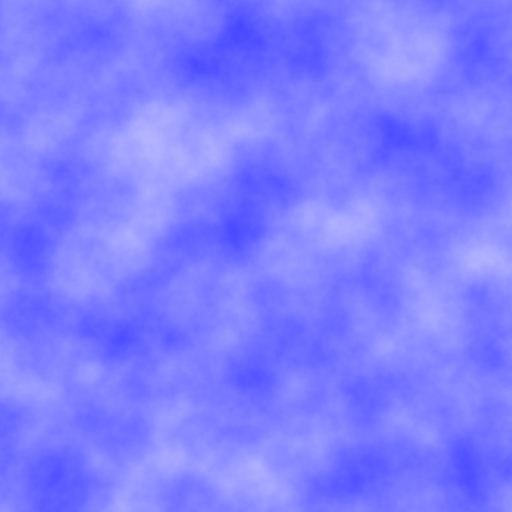
Let’s generate a beautiful cloud-like texture immediately to see what Perlin noise can do.
 1from PIL import Image
 2from noise import pnoise2
 3
 4# Image settings
 5width, height = 512, 512
 6scale = 100.0  # Controls zoom level
 7
 8# Create image
 9img = Image.new('RGB', (width, height))
10pixels = img.load()
11
12# Generate Perlin noise
13for y in range(height):
14    for x in range(width):
15        # Get Perlin noise value (-1 to 1)
16        noise_val = pnoise2(x / scale, y / scale, octaves=6)
17
18        # Map to 0-255 range
19        color = int((noise_val + 1) * 127.5)
20
21        # Create cloud-like blue tones
22        pixels[x, y] = (color, color, 255)
23
24img.save('perlin_clouds.png')
25img.show()
Result: A smooth, cloud-like texture with natural variations—no harsh transitions!
Tip
First time? Install the noise library: pip install noise
This module uses the noise library which implements Ken Perlin’s improved noise algorithm. It’s the industry-standard approach used in game engines, VFX software, and creative coding.
Understanding Perlin Noise#
What is Perlin noise?#
The problem with random noise:
When you generate random pixel values, you get harsh, chaotic static—no smoothness or structure. Each pixel is completely independent.
import numpy as np
from PIL import Image

# Random noise - each pixel independent
random_array = np.random.randint(0, 256, (200, 200, 3), dtype=np.uint8)
img = Image.fromarray(random_array)
# Result: TV static, no structure
Perlin noise solves this by creating random values that change smoothly across space. Neighboring pixels have similar values, creating flowing, organic patterns.
Key insight: Perlin noise isn’t truly random—it’s coherent noise. Values transition gradually, like waves in water or clouds in the sky.
Note
Historical context: Ken Perlin invented this algorithm in 1983 while working on the movie Tron. He needed realistic textures but found that random noise looked too harsh. His solution earned him an Academy Award for Technical Achievement in 1997!
How Perlin noise works (conceptually)#
You don’t need to implement Perlin noise from scratch, but understanding the core concept helps you use it effectively.

[PLACEHOLDER] Perlin noise uses a grid of random gradient vectors#
The algorithm in simple terms:
Create a grid of random gradient vectors (like tiny arrows pointing in random directions)
For any point in space, find the 4 nearest grid corners
Calculate influence of each corner’s gradient on that point
Smoothly blend the 4 influences using a special curve (smoothstep)
Result: A smooth value that flows naturally across space
Refresher: What’s interpolation?
If you completed Module 2.1 (Transformations), you learned about interpolation—smoothly transitioning between values. Perlin noise uses a special smooth interpolation called smoothstep that creates gentle, natural transitions.
Linear interpolation: value = start + t * (end - start)
Smoothstep: value = 3t² - 2t³ (smoother, more natural curve)
🔬 Deep Dive: Smoothstep Function
The smoothstep function creates an S-curve that has zero derivative at the endpoints. This means:
At t=0: output=0, slope=0 (smooth start)
At t=1: output=1, slope=0 (smooth end)
In between: gentle acceleration and deceleration
Formula: S(t) = 3t² - 2t³
This is why Perlin noise transitions look natural—they accelerate and decelerate smoothly, just like motion in nature.

[PLACEHOLDER] Smoothstep (blue) vs Linear (red): Notice the gentle S-curve#
Key parameters explained#
The noise library’s pnoise2() function has several parameters that dramatically change the output:
from noise import pnoise2

value = pnoise2(
    x,              # X coordinate (any float)
    y,              # Y coordinate (any float)
    octaves=1,      # Number of noise layers (default: 1)
    persistence=0.5, # How much each octave contributes
    lacunarity=2.0,  # Frequency multiplier between octaves
    repeatx=1024,    # Pattern repeat distance (or None)
    repeaty=1024,
    base=0           # Random seed
)
Parameter 1: Coordinates (x, y)
The input coordinates determine which noise value you get. Think of Perlin noise as an infinite texture—you sample different parts by changing x and y.
Scale matters: Divide coordinates by a scale factor to control zoom:
scale = 50.0  # Larger = more zoomed out (bigger patterns)
noise_val = pnoise2(x / scale, y / scale)
Parameter 2: Octaves (layers of detail)
Octaves add multiple layers of noise at different frequencies, creating natural complexity.

[PLACEHOLDER] Adding octaves: 1 octave (smooth), 2 octaves (detail added), 4 octaves (more detail), 8 octaves (fine texture)#
How it works:
Octave 1: Base noise (large features)
Octave 2: Double frequency, half amplitude (medium features)
Octave 3: Double frequency again, half amplitude again (fine features)
…and so on
Typical values:
octaves=1: Very smooth, blobby (good for base terrain)octaves=4: Balanced detail (good for clouds)octaves=6-8: Rich detail (good for complex textures)octaves=10+: Very detailed, almost noise-like (rarely needed)
Parameter 3: Persistence (detail strength)
Persistence controls how much each octave contributes. It’s the amplitude multiplier between octaves.
persistence=0.5(default): Each octave is half as strong as the previouspersistence=0.3: Higher octaves contribute less (smoother)persistence=0.7: Higher octaves contribute more (rougher)
Rule of thumb: Lower persistence = smoother, higher persistence = rougher
Parameter 4: Lacunarity (frequency multiplier)
Lacunarity controls how much the frequency increases between octaves.
lacunarity=2.0(default): Each octave is twice the frequencylacunarity=1.8: Slower frequency increase (more regular)lacunarity=3.0: Faster frequency increase (more chaotic)
Usually keep this at 2.0 unless you want unusual effects.
Important
Value range: pnoise2() returns values between -1.0 and 1.0
For images, you need to remap to 0-255:
noise_val = pnoise2(x, y)  # Returns -1.0 to 1.0
color = int((noise_val + 1) * 127.5)  # Remap to 0-255
Perlin noise vs random noise#
Let’s clarify the key differences:
Aspect |
Random Noise |
Perlin Noise |
|---|---|---|
Smoothness |
Harsh, chaotic jumps |
Smooth, flowing transitions |
Structure |
No correlation between neighbors |
Neighbors have similar values |
Appearance |
TV static, white noise |
Clouds, marble, organic |
Use cases |
Randomized decisions, dither patterns |
Textures, terrain, natural effects |
Performance |
Very fast (simple random) |
Slower (requires interpolation) |
Repeatability |
Different each time (unless seeded) |
Same coordinates = same value |
Tip
When to use each:
Random noise: Generating random positions, colors, decisions
Perlin noise: Creating natural-looking textures, terrain, flowing effects
Hands-On Exercises#
Now apply what you’ve learned through progressive exercises. Each builds your understanding of how parameters affect the output.
Exercise 1: Explore octaves#
Time estimate: 4-5 minutes Difficulty: Execute (Level 1)
Generate four Perlin noise textures with different octave counts to see how detail accumulates.
Your task:
Create a 2×2 grid of images showing octaves=1, 2, 4, and 8. Keep all other parameters the same.
from PIL import Image
from noise import pnoise2

width, height = 256, 256
scale = 100.0
octaves_list = [1, 2, 4, 8]

for idx, octaves in enumerate(octaves_list):
    img = Image.new('L', (width, height))  # 'L' = grayscale
    pixels = img.load()

    for y in range(height):
        for x in range(width):
            noise_val = pnoise2(x / scale, y / scale, octaves=octaves)
            color = int((noise_val + 1) * 127.5)
            pixels[x, y] = color

    img.save(f'perlin_octaves_{octaves}.png')
    img.show()
Observe:
How does the texture change as octaves increase?
At what octave count does it start looking “realistic”?
Can you see the layering of different frequencies?
💡 Solution & Explanation
The code above is complete! Just run it.
What you should see:
Octaves=1: Very smooth, blobby shapes (just the base layer)
Octaves=2: Medium-scale features added
Octaves=4: Good balance of large and small features (clouds!)
Octaves=8: Very detailed, almost gritty texture
Key insight: Natural textures need multiple scales of detail. A single octave looks too artificial, but 4-6 octaves create convincing organic patterns.
Real-world use: Game terrain typically uses 4-6 octaves. More octaves = more computation, so balance quality vs performance.
Exercise 2: Create natural textures#
Time estimate: 5-6 minutes Difficulty: Modify (Level 2)
Use Perlin noise to create three specific natural textures: clouds, marble, and wood grain. You’ll adjust parameters and add color mapping.
Your task:
Generate these three textures by modifying the parameters:
Cloud texture (soft, billowy)
Marble texture (swirling veins)
Wood grain (linear rings)
from PIL import Image
from noise import pnoise2

def create_clouds(width=400, height=400):
    """Soft, billowy clouds"""
    img = Image.new('RGB', (width, height))
    pixels = img.load()

    scale = 100.0
    octaves = 6
    persistence = 0.5

    for y in range(height):
        for x in range(width):
            noise_val = pnoise2(x / scale, y / scale,
                               octaves=octaves,
                               persistence=persistence)

            # Map to cloud colors (white to light blue)
            intensity = (noise_val + 1) * 0.5  # 0 to 1
            r = int(200 + intensity * 55)
            g = int(220 + intensity * 35)
            b = 255

            pixels[x, y] = (r, g, b)

    return img

def create_marble(width=400, height=400):
    """Swirling marble veins"""
    img = Image.new('RGB', (width, height))
    pixels = img.load()

    # Your parameters here
    # Hint: Try smaller scale, more octaves, higher persistence

    for y in range(height):
        for x in range(width):
            # Your noise generation here
            # Hint: Add some turbulence by using noise_val * 10
            pass

    return img

def create_wood(width=400, height=400):
    """Wood grain rings"""
    img = Image.new('RGB', (width, height))
    pixels = img.load()

    # Your parameters here
    # Hint: Use distance from center + Perlin noise

    for y in range(height):
        for x in range(width):
            # Your noise generation here
            # Hint: Calculate distance, add noise, use sine function
            pass

    return img

# Generate all three
create_clouds().save('texture_clouds.png')
create_marble().save('texture_marble.png')
create_wood().save('texture_wood.png')
Hints:
Clouds: Already provided! Use as reference.
Marble: Try
scale=50, octaves=8, persistence=0.6, map to grays with some color tintWood: Calculate
distance = sqrt((x-width/2)² + (y-height/2)²), add noise, usesin()for rings
💡 Complete Solutions
Marble texture:
def create_marble(width=400, height=400):
    img = Image.new('RGB', (width, height))
    pixels = img.load()

    scale = 50.0
    octaves = 8
    persistence = 0.6

    for y in range(height):
        for x in range(width):
            # Get base noise
            noise_val = pnoise2(x / scale, y / scale,
                               octaves=octaves,
                               persistence=persistence)

            # Add turbulence (amplify for veins)
            turbulence = noise_val * 10

            # Use sine for vein patterns
            vein_pattern = (1 + abs(np.sin(turbulence))) * 0.5

            # Map to marble colors (white with gray veins)
            intensity = vein_pattern
            r = int(220 + intensity * 35)
            g = int(210 + intensity * 35)
            b = int(200 + intensity * 45)

            pixels[x, y] = (r, g, b)

    return img
Wood grain:
import math

def create_wood(width=400, height=400):
    img = Image.new('RGB', (width, height))
    pixels = img.load()

    scale = 80.0
    center_x, center_y = width // 2, height // 2

    for y in range(height):
        for x in range(width):
            # Distance from center
            dx = x - center_x
            dy = y - center_y
            distance = math.sqrt(dx*dx + dy*dy)

            # Add Perlin noise for irregularity
            noise_val = pnoise2(x / scale, y / scale, octaves=4)

            # Create rings using sine wave + noise
            ring_pattern = math.sin((distance + noise_val * 20) * 0.1)

            # Map to wood colors (brown tones)
            intensity = (ring_pattern + 1) * 0.5  # 0 to 1
            r = int(120 + intensity * 60)
            g = int(70 + intensity * 40)
            b = int(30 + intensity * 20)

            pixels[x, y] = (r, g, b)

    return img
How they work:
Marble: High octaves create fine veins, sine function creates swirling patterns
Wood: Distance from center creates concentric circles, noise adds natural irregularity
Experiment: Try different colors, scales, and octave counts for infinite variations!

[PLACEHOLDER] Exercise outputs: Clouds (left), Marble (center), Wood grain (right)#
Exercise 3: Terrain heightmap#
Time estimate: 6-7 minutes Difficulty: Create (Level 3)
Use Perlin noise to generate a 2D terrain heightmap, then visualize it with color-coding: water (blue), land (green), mountains (brown).
Your task:
Generate Perlin noise as terrain heights
Map height ranges to terrain types
Color-code the terrain for visualization
from PIL import Image
from noise import pnoise2

def generate_terrain(width=512, height=512):
    img = Image.new('RGB', (width, height))
    pixels = img.load()

    # Terrain generation parameters
    scale = 100.0
    octaves = 6
    persistence = 0.5

    for y in range(height):
        for x in range(width):
            # Generate height value (-1 to 1)
            height_val = pnoise2(x / scale, y / scale,
                                octaves=octaves,
                                persistence=persistence)

            # Map to terrain types based on height thresholds
            if height_val < -0.3:
                # Deep water
                color = (0, 0, 139)
            elif height_val < 0.0:
                # Shallow water
                color = (65, 105, 225)
            elif height_val < 0.3:
                # Beach/lowlands
                color = (238, 214, 175)
            elif height_val < 0.5:
                # Grass/forest
                color = (34, 139, 34)
            elif height_val < 0.7:
                # Hills
                color = (139, 90, 43)
            else:
                # Mountains/snow
                color = (255, 250, 250)

            pixels[x, y] = color

    return img

# Generate terrain
terrain = generate_terrain()
terrain.save('terrain_map.png')
terrain.show()
Observe:
Do you see islands? Continents? Mountain ranges?
How do octaves affect the terrain complexity?
What happens if you change persistence?
Extension ideas:
Add more elevation bands (e.g., forests, grasslands separately)
Generate multiple maps with different seeds (
baseparameter)Create a height gradient overlay (darker = lower, lighter = higher)
💡 Enhancement: Better Terrain
Add elevation-based shading:
# Instead of fixed colors, blend based on exact height
normalized_height = (height_val + 1) * 0.5  # 0 to 1

# Water to land gradient
if normalized_height < 0.35:
    # Water (dark blue to light blue)
    water_depth = normalized_height / 0.35
    r = 0
    g = int(water_depth * 105)
    b = int(139 + water_depth * 116)
    color = (r, g, b)
elif normalized_height < 0.45:
    # Beach (sandy)
    color = (238, 214, 175)
else:
    # Land (green to brown to white)
    land_height = (normalized_height - 0.45) / 0.55
    if land_height < 0.5:
        # Green to brown
        t = land_height * 2
        r = int(34 + t * 105)
        g = int(139 - t * 49)
        b = 34
    else:
        # Brown to snow
        t = (land_height - 0.5) * 2
        r = int(139 + t * 116)
        g = int(90 + t * 160)
        b = int(43 + t * 207)
    color = (r, g, b)
Result: Smooth transitions between terrain types instead of harsh boundaries!

[PLACEHOLDER] Terrain heightmap: Water (dark blue), lowlands (green), hills (brown), mountains (white)#
Summary#
In this module, you’ve learned to harness the power of Perlin noise for creating organic, natural-looking patterns:
Key takeaways:
Perlin noise creates smooth randomness unlike harsh random noise
Core mechanism: Grid of gradient vectors + smooth interpolation (smoothstep)
Key parameters:
Scale: Controls zoom (larger = bigger features)
Octaves: Layers of detail (4-6 typical, more = finer detail)
Persistence: Detail strength (0.5 default, lower = smoother)
Lacunarity: Frequency multiplier (2.0 default)
Value range: -1.0 to 1.0 (remap to 0-255 for images)
Applications: Textures (clouds, marble, wood), terrain generation, organic effects
Tool:
noiselibrary implements industry-standard Perlin noise
Why Perlin noise matters for generative art:
Natural patterns are never perfectly random nor perfectly ordered. They have structure with variation—exactly what Perlin noise provides. It’s the foundation for:
Procedural terrain in games (Minecraft, No Man’s Sky)
Texture generation in VFX (clouds, fire, smoke)
Organic motion (flow fields, particle systems)
Displacement effects (warping, distortion)
Tip
Remember: Perlin noise is just one tool in your procedural generation toolkit. In later modules, you’ll combine it with other techniques (fractals, cellular automata, L-systems) to create even more complex and beautiful generative art.
Common pitfalls to avoid#
Forgetting to remap values:
pnoise2()returns -1 to 1, not 0 to 255Scale too small: Makes the noise too “zoomed in” (high frequency)
Too many octaves: Diminishing returns after 8-10, just adds computation
Not experimenting: Perlin noise parameters are meant to be tweaked—play with them!
Next Steps#
Now that you understand Perlin noise, you’re ready to:
Module 6.1.2 — Simplex noise (improved Perlin, faster and fewer artifacts)
Module 6.2 — Terrain generation techniques (erosion, hydraulic simulation)
Module 6.3 — Texture synthesis and procedural materials
Advanced applications (future modules):
Combine Perlin noise with fractals for infinite landscapes
Use time-varying noise for smooth animations
Create flow fields for particle system guidance
Implement domain warping for surreal effects
References#
Perlin, Ken. “An Image Synthesizer.” SIGGRAPH ‘85: Proceedings of the 12th Annual Conference on Computer Graphics and Interactive Techniques (1985): 287-296. https://doi.org/10.1145/325334.325247
Perlin, Ken. “Improving Noise.” SIGGRAPH ‘02: Proceedings of the 29th Annual Conference on Computer Graphics and Interactive Techniques (2002): 681-682. [Improved Perlin noise algorithm]
Ebert, David S., et al. “Texturing and Modeling: A Procedural Approach.” 3rd ed. Morgan Kaufmann, 2003. [Chapter 2: Noise and Turbulence]
Shiffman, Daniel. “The Nature of Code: Simulating Natural Systems with Processing.” Self-published, 2012. Chapter 0.5: Perlin Noise. Available at https://natureofcode.com
Noise Library Documentation. Python noise library for Perlin, Simplex, and other noise functions. https://pypi.org/project/noise/
Gustavson, Stefan. “Simplex noise demystified.” 2005. Technical report, Linköping University. [Explains Perlin vs Simplex]
Olano, Marc. “Modified Noise for Evaluation on Graphics Hardware.” ACM SIGGRAPH/Eurographics Workshop on Graphics Hardware (2005). [GPU implementation techniques]