
4.1.3 Mandelbrot Set#
- Duration:
25-30 minutes
- Level:
Intermediate
Overview#
The Mandelbrot set is perhaps the most famous fractal in mathematics, revealing infinite complexity from an elegantly simple formula: \(z_{n+1} = z_n^2 + c\). Named after mathematician Benoit Mandelbrot, who first visualized it using computers in 1980, this fractal has become an icon of both mathematical beauty and computational art [Mandelbrot1982]. Its discovery helped launch the popular understanding of chaos theory and fractal geometry [Gleick1987].
In this exercise, you will implement the escape-time algorithm to generate stunning Mandelbrot visualizations. You will learn how complex numbers behave under iteration and discover why some points remain bounded forever (belonging to the set) while others spiral off to infinity. This forms the foundation for understanding many other fractal systems, including Julia sets and Newton fractals.
Learning Objectives#
By the end of this exercise, you will be able to:
Understand complex number arithmetic and visualize numbers on the complex plane
Implement the Mandelbrot iteration algorithm using vectorized NumPy operations
Apply color mapping techniques to transform iteration counts into striking visualizations
Explore self-similarity by zooming into different regions of the fractal
Quick Start: See It In Action#
Run this code to generate your first Mandelbrot set visualization:
 1import numpy as np
 2from PIL import Image
 3
 4# Create a grid of complex numbers
 5x = np.linspace(-2.5, 1.0, 512)
 6y = np.linspace(-1.5, 1.5, 512)
 7real, imag = np.meshgrid(x, y)
 8c = real + 1j * imag
 9
10# Iterate z = z^2 + c
11z = np.zeros_like(c)
12iterations = np.zeros(c.shape, dtype=np.int32)
13for i in range(100):
14    mask = np.abs(z) <= 2
15    z[mask] = z[mask]**2 + c[mask]
16    iterations[mask] += 1
17
18# Map to colors and save
19colors = (iterations / 100 * 255).astype(np.uint8)
20Image.fromarray(colors).save('mandelbrot_basic.png')
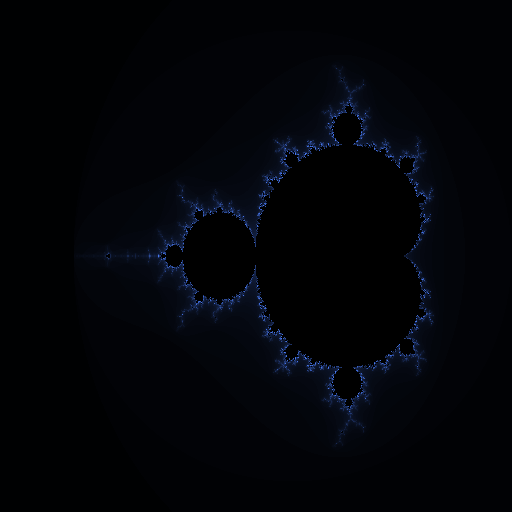
The Mandelbrot set rendered with a blue color gradient. The black region is the set itself, where points never escape. The colored regions show how quickly points escape, with darker colors indicating more iterations before escape.#
The iconic shape emerges: a cardioid-shaped main body connected to circular bulbs, with intricate detail at every boundary. Each pixel represents one complex number, colored according to how many iterations it took to determine whether that point belongs to the Mandelbrot set.
Core Concepts#
Concept 1: Complex Numbers and the Complex Plane#
A complex number has the form \(c = a + bi\), where \(a\) is the real part, \(b\) is the imaginary part, and \(i = \sqrt{-1}\) is the imaginary unit [Devaney1989]. We can visualize complex numbers as points on a 2D plane, where the horizontal axis represents the real part and the vertical axis represents the imaginary part.
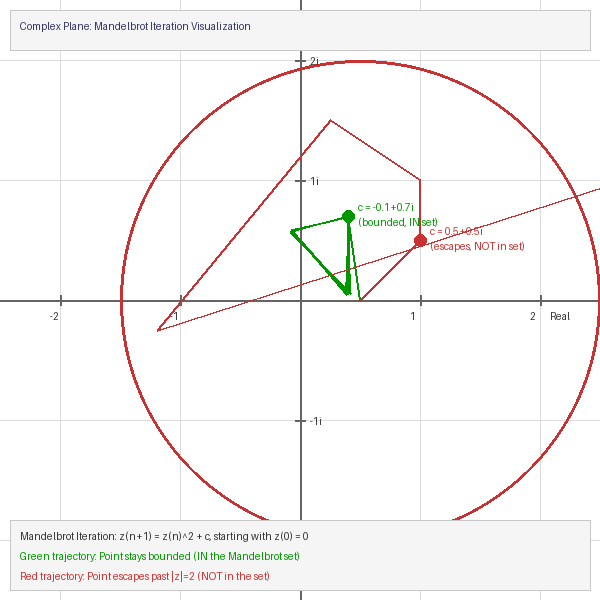
The complex plane showing the escape boundary (|z| = 2 circle) and two example trajectories. The green path stays bounded (point is IN the set), while the red path escapes (point is NOT in the set).#
In NumPy, we can create arrays of complex numbers easily:
 1import numpy as np
 2
 3# Create 1D arrays for real and imaginary values
 4real_values = np.linspace(-2.5, 1.0, 512)   # Real axis: -2.5 to 1.0
 5imag_values = np.linspace(-1.5, 1.5, 512)   # Imaginary axis: -1.5 to 1.5
 6
 7# Create 2D grids
 8real_grid, imag_grid = np.meshgrid(real_values, imag_values)
 9
10# Combine into complex numbers: c = real + imaginary * i
11c = real_grid + 1j * imag_grid  # 1j is Python's imaginary unit
12
13print(f"Shape: {c.shape}")         # (512, 512)
14print(f"Top-left corner: {c[0,0]}") # (-2.5-1.5j)
Important
Each pixel in our image corresponds to one complex number. The entire image is a “window” into the complex plane. By changing the ranges in np.linspace(), you can zoom into different regions of the plane.
Concept 2: The Mandelbrot Iteration Algorithm#
The Mandelbrot set is defined by a deceptively simple iteration formula [Mandelbrot1982]:
Starting with \(z_0 = 0\), we repeatedly apply this formula. For each complex number \(c\), we ask: does the sequence \(z_0, z_1, z_2, ...\) stay bounded, or does it escape to infinity?
If the sequence stays bounded (
|z|never exceeds 2), then \(c\) belongs to the Mandelbrot setIf the sequence escapes (
|z| > 2at some iteration), then \(c\) is outside the set
Note
Mathematically, once |z| > 2, the sequence is guaranteed to escape to infinity. This is why we use 2 as our escape threshold.
Here is the core algorithm with detailed annotations:
 1# For a single point c, track the iteration
 2c = complex(-0.5, 0.5)  # Example point
 3z = 0                    # Always start at z_0 = 0
 4max_iterations = 100
 5
 6for n in range(max_iterations):
 7    z = z**2 + c         # Apply the formula
 8
 9    # Check escape condition
10    if abs(z) > 2:       # |z| > 2 means this point escapes
11        print(f"Point escaped after {n} iterations")
12        break
13else:
14    # Loop completed without break - point never escaped
15    print("Point is IN the Mandelbrot set")
The algorithm’s power comes from tracking the iteration count when a point escapes. Points that escape quickly get low counts, while points near the boundary take many iterations to escape. This creates the beautiful gradient patterns we see in Mandelbrot visualizations.
Did You Know?
The boundary of the Mandelbrot set has infinite length but encloses a finite area of approximately 1.5065 square units [Ewing1992]. This seemingly paradoxical property is characteristic of fractal geometry.
Concept 3: Escape Time and Color Mapping#
The escape time algorithm records how many iterations each point takes before escaping. Points inside the set never escape and receive the maximum iteration count [Peitgen1986]. This iteration count data becomes our raw material for visualization.
Different color mapping techniques produce dramatically different visual effects from the same mathematical data:
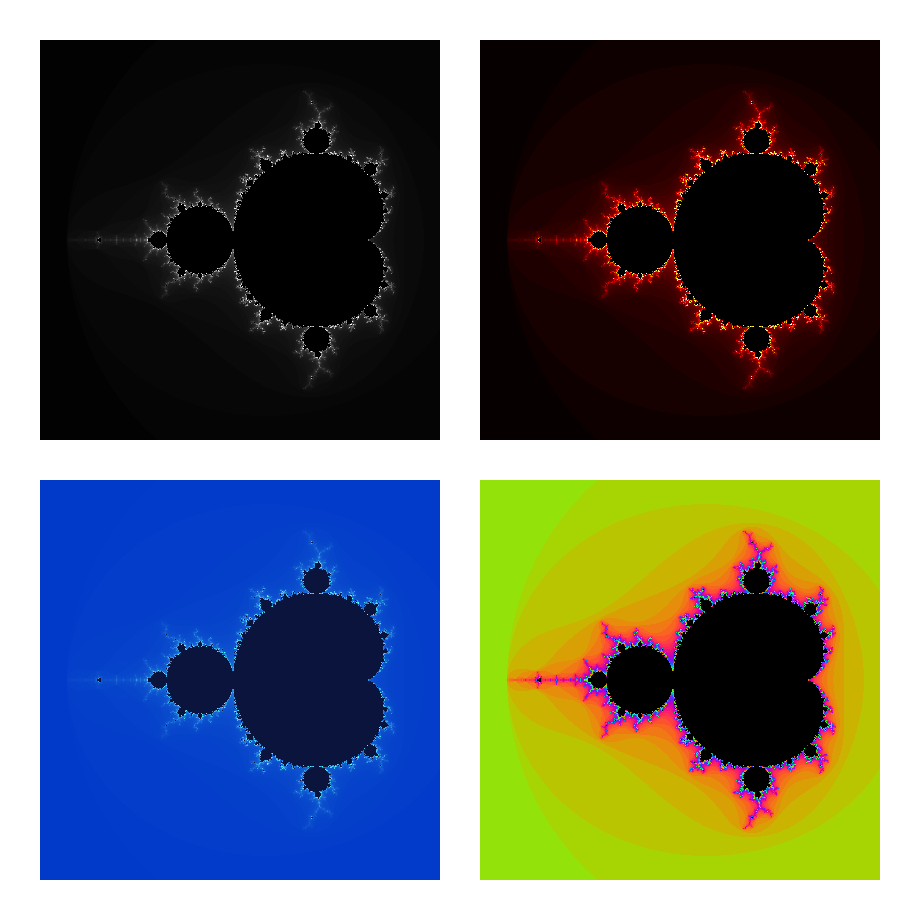
The same Mandelbrot set data rendered with four different color schemes. Top-left: Grayscale. Top-right: Fire (red/orange/yellow). Bottom-left: Ocean (blue/cyan). Bottom-right: Rainbow (cyclic colors). The mathematical content is identical; only the interpretation changes.#
 1# iteration_count is our 2D array of escape times
 2# Normalize to 0-1 range
 3normalized = iteration_count / max_iterations
 4
 5# Create RGB image
 6image = np.zeros((height, width, 3), dtype=np.uint8)
 7
 8# Apply gradient: dark blue -> light blue -> white
 9mask_outside = iteration_count < max_iterations
10image[mask_outside, 0] = (normalized[mask_outside] * 80).astype(np.uint8)   # Red
11image[mask_outside, 1] = (normalized[mask_outside] * 150).astype(np.uint8)  # Green
12image[mask_outside, 2] = (normalized[mask_outside] * 255).astype(np.uint8)  # Blue
13
14# Points inside the set: black
15image[~mask_outside] = [0, 0, 0]
Tip
For more visually striking results, use cyclic color mappings (like sine waves) that create bands of color. This emphasizes the fractal detail at the boundary of the set.
Hands-On Exercises#
Exercise 1: Execute and Explore#
Run the main Mandelbrot script and observe the output:
python mandelbrot_set.py
Then answer these reflection questions:
Which region of the image has the darkest colors? What does this indicate about those points?
Look at the boundary between the black region and the colored region. What do you notice about the level of detail there?
The main body of the set looks like a heart shape (cardioid). Why do you think this specific shape emerges from such a simple formula?
What do you predict would happen if you increased
max_iterationsfrom 100 to 500?
Solution & Explanation
Answers:
The darkest colors appear right outside the black Mandelbrot set, particularly along its boundary. These points take many iterations to escape, meaning they are “almost” in the set. The darkness indicates high iteration counts.
The boundary has the most intricate detail. This is where the fractal nature is most apparent. No matter how much you zoom in, you will always find more detail at the boundary. This is the hallmark of fractals.
The cardioid shape emerges because of how complex number squaring works geometrically. Squaring a complex number doubles its angle and squares its magnitude. The points that stay bounded under repeated squaring form this characteristic shape.
Increasing
max_iterationsto 500 would:Reveal more detail at the boundary (more color gradations)
Make computation slower (5x more iterations)
Not change the black region much (points inside still never escape)
Show subtle details that were previously too fine to detect
Exercise 2: Modify Parameters#
Modify the mandelbrot_set.py script to achieve these goals:
Goal 1: Zoom into the “Seahorse Valley” region centered at (-0.745, 0.113)
Goal 2: Change the color scheme from blue gradient to a “fire” colormap (red/orange/yellow)
Goal 3: Increase the resolution to 1024x1024 pixels
Hint for Goal 1
Change the viewing window parameters. To zoom into a specific point, make the x and y ranges smaller and centered on that point:
x_min, x_max = -0.8, -0.7    # Narrow x range around -0.745
y_min, y_max = 0.05, 0.15     # Narrow y range around 0.113
Hint for Goal 2
Modify the color mapping section. For a fire gradient, increase red first, then add green:
# Fire gradient
image[mask, 0] = (normalized[mask] * 255).astype(np.uint8)       # Red: full
image[mask, 1] = (normalized[mask] * 150).astype(np.uint8)       # Green: partial
image[mask, 2] = (normalized[mask] * 50).astype(np.uint8)        # Blue: minimal
Complete Solution
 1import numpy as np
 2from PIL import Image
 3
 4# GOAL 3: Increased resolution
 5width = 1024
 6height = 1024
 7
 8# GOAL 1: Zoom into Seahorse Valley
 9x_min, x_max = -0.8, -0.69
10y_min, y_max = 0.05, 0.16
11
12max_iterations = 200  # More iterations for zoomed view
13
14# Create complex grid
15real = np.linspace(x_min, x_max, width)
16imag = np.linspace(y_min, y_max, height)
17real_grid, imag_grid = np.meshgrid(real, imag)
18c = real_grid + 1j * imag_grid
19
20# Iterate
21z = np.zeros_like(c, dtype=np.complex128)
22iteration_count = np.zeros(c.shape, dtype=np.int32)
23for i in range(max_iterations):
24    still_bounded = np.abs(z) <= 2
25    z[still_bounded] = z[still_bounded]**2 + c[still_bounded]
26    iteration_count[still_bounded] += 1
27
28# GOAL 2: Fire colormap
29normalized = iteration_count / max_iterations
30image = np.zeros((height, width, 3), dtype=np.uint8)
31mask = iteration_count < max_iterations
32
33image[mask, 0] = (normalized[mask] * 255).astype(np.uint8)  # Red
34image[mask, 1] = (normalized[mask] * 150).astype(np.uint8)  # Green
35image[mask, 2] = (normalized[mask] * 30).astype(np.uint8)   # Blue
36
37Image.fromarray(image).save('mandelbrot_seahorse_fire.png')
Exercise 3: Create a Zoom Function#
Create a reusable function that generates Mandelbrot images at any zoom level and location. Your function should:
Requirements:
Accept parameters for center point (x, y), zoom level, and image size
Calculate the appropriate viewing window from the zoom level
Return an RGB image array
Starter Code:
 1import numpy as np
 2from PIL import Image
 3
 4def mandelbrot_zoom(center_x, center_y, zoom_level, size=512, max_iter=200):
 5    """
 6    Generate a Mandelbrot image at the specified location and zoom.
 7
 8    Parameters:
 9        center_x, center_y: Center point in the complex plane
10        zoom_level: Magnification factor (1 = full view, 10 = 10x zoom)
11        size: Image dimensions (square)
12        max_iter: Maximum iterations
13
14    Returns:
15        np.ndarray: RGB image array
16    """
17    # TODO: Calculate x_min, x_max, y_min, y_max from center and zoom
18
19    # TODO: Create complex grid
20
21    # TODO: Run iteration algorithm
22
23    # TODO: Apply color mapping
24
25    # TODO: Return image array
26    pass
27
28
29# Test your function
30if __name__ == '__main__':
31    # Generate zoomed image
32    image = mandelbrot_zoom(-0.745, 0.113, zoom_level=50)
33    Image.fromarray(image).save('my_zoom.png')
34    print("Zoomed image saved!")
Hint: Calculating the viewing window
The base viewing window spans about 3.5 units horizontally and 3.0 units vertically. To zoom in by a factor of N, divide these ranges by N:
base_width = 3.5
base_height = 3.0
x_range = base_width / zoom_level
y_range = base_height / zoom_level

x_min = center_x - x_range / 2
x_max = center_x + x_range / 2
Complete Solution
 1import numpy as np
 2from PIL import Image
 3
 4def mandelbrot_zoom(center_x, center_y, zoom_level, size=512, max_iter=200):
 5    """Generate a Mandelbrot image at the specified location and zoom."""
 6
 7    # Calculate viewing window
 8    x_range = 3.5 / zoom_level
 9    y_range = 3.0 / zoom_level
10    x_min = center_x - x_range / 2
11    x_max = center_x + x_range / 2
12    y_min = center_y - y_range / 2
13    y_max = center_y + y_range / 2
14
15    # Create complex grid
16    real = np.linspace(x_min, x_max, size)
17    imag = np.linspace(y_min, y_max, size)
18    real_grid, imag_grid = np.meshgrid(real, imag)
19    c = real_grid + 1j * imag_grid
20
21    # Iterate
22    z = np.zeros_like(c, dtype=np.complex128)
23    iterations = np.zeros(c.shape, dtype=np.int32)
24    for i in range(max_iter):
25        mask = np.abs(z) <= 2
26        z[mask] = z[mask]**2 + c[mask]
27        iterations[mask] += 1
28
29    # Color mapping (rainbow)
30    image = np.zeros((size, size, 3), dtype=np.uint8)
31    norm = iterations / max_iter
32    outside = iterations < max_iter
33
34    image[outside, 0] = (128 + 127*np.sin(norm[outside]*10)).astype(np.uint8)
35    image[outside, 1] = (128 + 127*np.sin(norm[outside]*10+2)).astype(np.uint8)
36    image[outside, 2] = (128 + 127*np.sin(norm[outside]*10+4)).astype(np.uint8)
37
38    return image
39
40if __name__ == '__main__':
41    image = mandelbrot_zoom(-0.745, 0.113, zoom_level=50)
42    Image.fromarray(image).save('my_zoom.png')
43    print("Zoomed image saved!")
Challenge Extension: Create Zoom Animation#
Using your zoom function, create an animated GIF that zooms into an interesting region of the Mandelbrot set.
 1import imageio
 2
 3frames = []
 4target_x, target_y = -0.745, 0.113  # Seahorse valley
 5
 6for i in range(60):
 7    zoom = 1.2 ** i  # Exponential zoom
 8    print(f"Generating frame {i+1}/60 at {zoom:.1f}x zoom...")
 9    frame = mandelbrot_zoom(target_x, target_y, zoom, size=256, max_iter=150)
10    frames.append(frame)
11
12imageio.mimsave('mandelbrot_zoom.gif', frames, fps=15)
13print("Animation saved as mandelbrot_zoom.gif")
Summary#
Key Takeaways#
The Mandelbrot set is defined by the iteration \(z = z^2 + c\), where points that stay bounded belong to the set
Complex numbers can be visualized on a 2D plane, with real and imaginary axes corresponding to x and y coordinates
The escape time algorithm tracks how many iterations until
|z| > 2, creating the data for visualizationColor mapping transforms iteration counts into visual representations, with many possible artistic interpretations
Common Pitfalls#
Forgetting dtype=complex128: When creating the z array, use
dtype=np.complex128to avoid precision errorsUsing loops instead of vectorization: Always use NumPy masks (
z[mask]) rather than Python loops for performanceNot increasing iterations when zooming: Deeper zooms reveal more detail, which requires more iterations to resolve
These common errors align with cognitive load principles [Sweller2019]: breaking down complex algorithms into smaller steps helps learners avoid overload [Mayer2020].
Next Steps#
Continue to ../../4.1.4_julia_sets/README to explore Julia sets, which use the same iteration formula but with a fixed value of c for all points. You will discover how Mandelbrot and Julia sets are mathematically connected.
References#
Mandelbrot, B. B. (1982). The Fractal Geometry of Nature. W.H. Freeman and Company. ISBN: 978-0-7167-1186-5
Peitgen, H.-O., & Richter, P. H. (1986). The Beauty of Fractals: Images of Complex Dynamical Systems. Springer-Verlag. https://doi.org/10.1007/978-3-642-61717-1
Devaney, R. L. (1989). An Introduction to Chaotic Dynamical Systems (2nd ed.). Addison-Wesley. ISBN: 978-0-8133-4085-2
Gleick, J. (1987). Chaos: Making a New Science. Viking Press. ISBN: 978-0-14-009250-9
Ewing, J. H., & Schober, G. (1992). The area of the Mandelbrot set. Numerische Mathematik, 61(1), 59-72. https://doi.org/10.1007/BF01385497
Harris, C. R., et al. (2020). Array programming with NumPy. Nature, 585, 357-362. https://doi.org/10.1038/s41586-020-2649-2
Mayer, R. E. (2020). Multimedia Learning (3rd ed.). Cambridge University Press. https://doi.org/10.1017/9781316941355
Sweller, J., van Merriënboer, J. J. G., & Paas, F. (2019). Cognitive architecture and instructional design: 20 years later. Educational Psychology Review, 31, 261-292. https://doi.org/10.1007/s10648-019-09465-5