
4.1.2 - Dragon Curve#
- Duration:
20-25 minutes
- Level:
Intermediate
Overview#
In this exercise, you will create the Heighway dragon curve, one of the most elegant fractals discovered in the 20th century. Named after NASA physicist John Heighway who first investigated it in 1966, the dragon curve emerges from repeatedly folding a strip of paper in half, then unfolding so each fold opens to 90 degrees [Gardner1967].
The curve never crosses itself, tiles the plane when combined with copies, and exhibits self-similarity at every scale. By the end of this exercise, you will understand and implement the recursive algorithm that generates this intricate fractal using turtle graphics rendering.
Learning Objectives#
By completing this exercise, you will be able to:
Understand the paper-folding metaphor and its connection to recursive sequences
Implement the dragon curve generation algorithm using L/R turn sequences
Visualize fractals at multiple iteration depths using turtle graphics
Analyze self-similarity and fractal dimension in mathematical patterns
Quick Start: See the Dragon Emerge#
Let’s begin by seeing what we’re creating. Run the following code to generate a dragon curve at depth 10 (equivalent to folding a paper strip 10 times):
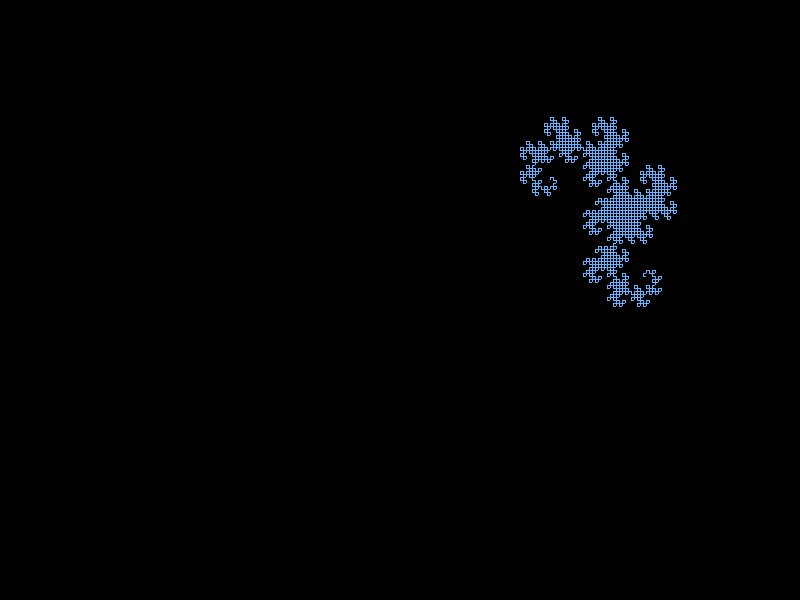
The Heighway dragon curve at iteration depth 10, containing 2,047 line segments. Notice how the curve never crosses itself and exhibits dragon-like symmetry.#
 1import numpy as np
 2from PIL import Image
 3
 4# Direction constants for turtle graphics
 5LEFT, UP, RIGHT, DOWN = range(4)
 6
 7def turn_left(direction):
 8    return (direction + 3) % 4
 9
10def turn_right(direction):
11    return (direction + 1) % 4
12
13def generate_dragon_sequence(initial_turn, depth):
14    """Generate the L/R turn sequence recursively."""
15    if depth == 0:
16        return initial_turn
17    else:
18        previous = generate_dragon_sequence(initial_turn, depth - 1)
19        inverted = ''.join(['L' if c == 'R' else 'R' for c in previous[::-1]])
20        return previous + 'R' + inverted
21
22# Generate sequence for depth 10
23sequence = generate_dragon_sequence('R', 10)
24print(f"Sequence length: {len(sequence)} turns")
You have just generated a sequence of 2,047 turn instructions that, when followed like a turtle drawing path, create the dragon curve you see above. The magic lies in how such a simple recursive rule produces such intricate beauty.
Core Concepts#
Concept 1: The Paper Folding Metaphor#
The dragon curve has an intuitive physical interpretation. Imagine a long strip of paper that you fold in half repeatedly, always folding in the same direction (say, right-over-left). After making several folds, unfold the paper so that each crease opens to exactly 90 degrees [Davis1970].
Try It Yourself
Take a strip of paper and fold it in half 4 times, always folding the right side over the left. Then carefully unfold it, making each fold a 90-degree angle. The resulting shape is the dragon curve at depth 4.
The sequence of left and right turns at each fold point follows a precise pattern:
Depth |
Turn Sequence |
Length |
|---|---|---|
0 |
R |
1 |
1 |
R R L |
3 |
2 |
RRL R RLL |
7 |
3 |
RRLRRLL R RRLRLL |
15 |
4 |
RRLRRLLRRRLLRLL R RRLRRLLRRRLLRLL |
31 |
The pattern follows a simple rule: each iteration takes the previous sequence, adds an ‘R’ in the middle (the new fold point), and appends the previous sequence reversed and inverted (L becomes R, R becomes L).
Concept 2: The Recursive Algorithm#
The mathematical definition of the dragon curve sequence is elegantly recursive:
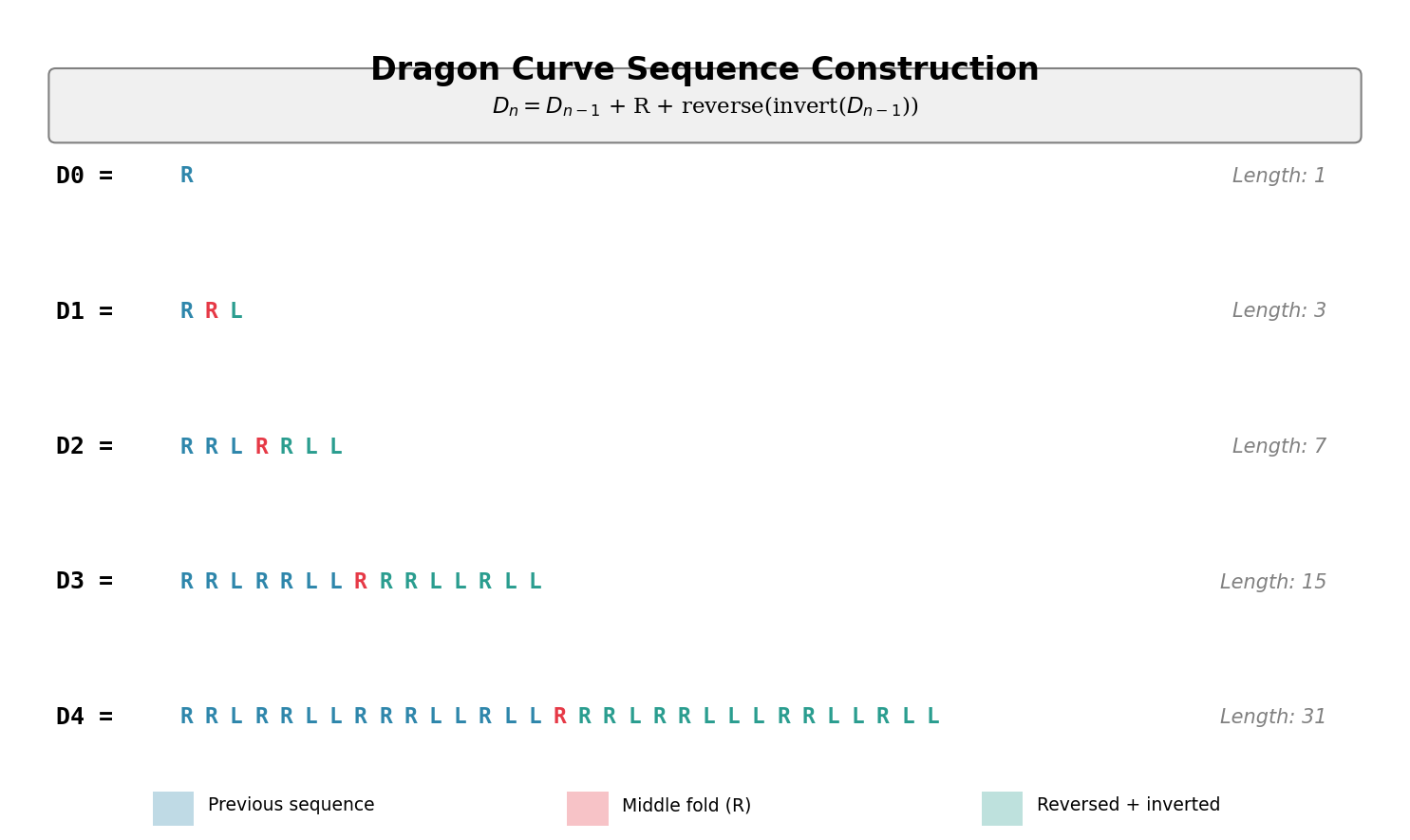
Visual representation of the recursive sequence construction. Diagram generated with Claude - Opus 4.5.#
Where invert swaps all L’s and R’s, and reverse reads the sequence backward.
Here is the Python implementation:
 1def invert_sequence(sequence):
 2    """Swap all L's and R's."""
 3    return ''.join(['L' if char == 'R' else 'R' for char in sequence])
 4
 5def generate_dragon_sequence(initial_turn, depth):
 6    """Generate dragon curve sequence recursively."""
 7    if depth == 0:
 8        return initial_turn
 9    else:
10        previous = generate_dragon_sequence(initial_turn, depth - 1)
11        second_half = invert_sequence(previous[::-1])  # reversed and inverted
12        return previous + 'R' + second_half
Lines 8-10 are the heart of the algorithm:
Get the sequence from the previous depth (recursive call)
Create the second half by reversing and inverting the previous sequence
Combine them with ‘R’ in the middle (the fold point)
Important
The sequence length follows the formula \(2^{n+1} - 1\) where \(n\) is the depth. At depth 10, this gives \(2^{11} - 1 = 2047\) turn instructions.
Concept 3: Turtle Graphics Rendering#
The turn sequence tells us how to move, but we need a rendering system to actually draw the curve. We use a turtle graphics approach where an imaginary turtle starts at a position, faces a direction, and follows instructions:
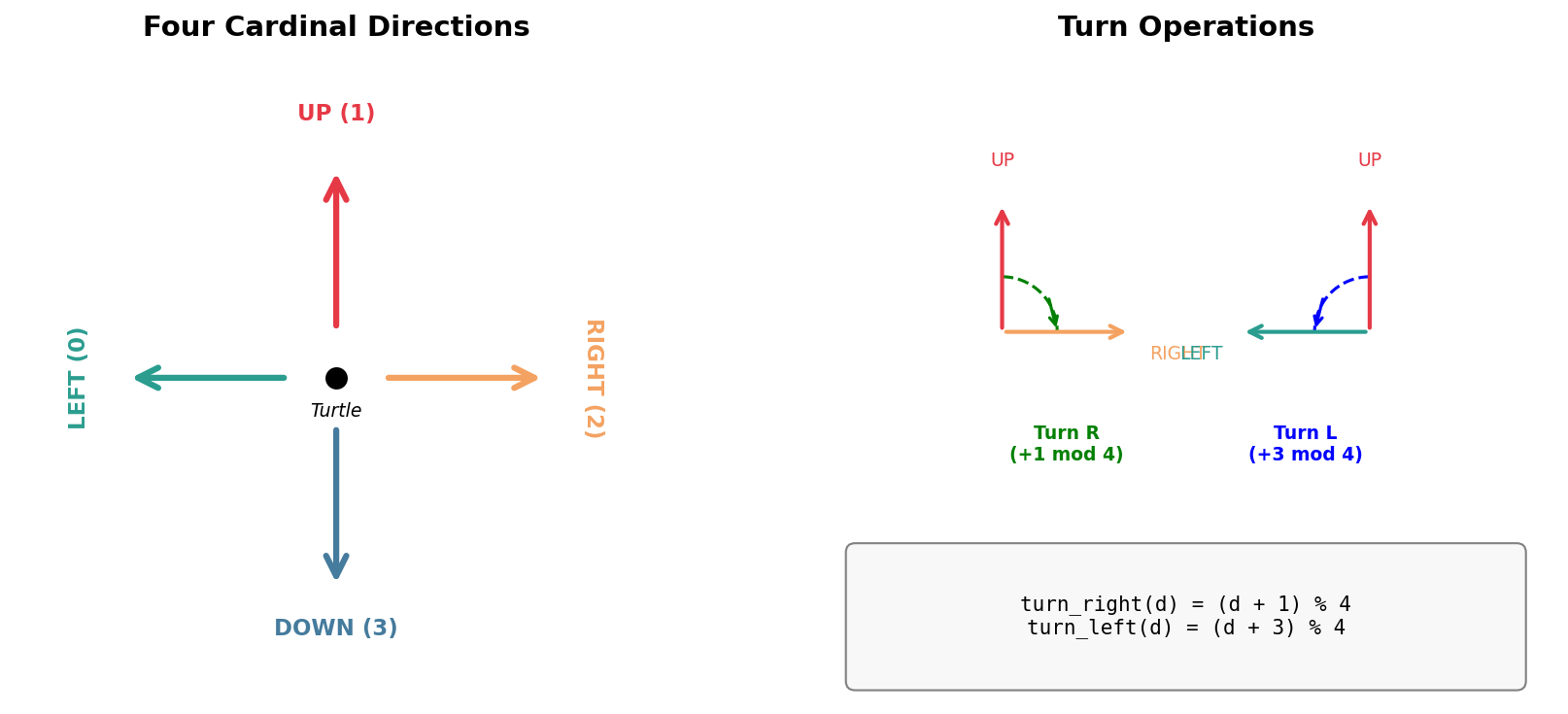
The turtle graphics direction system and turn operations. Diagram generated with Claude - Opus 4.5.#
Forward: Move one step in the current direction and draw a line
L (Left): Turn 90 degrees counter-clockwise
R (Right): Turn 90 degrees clockwise
 1def move_forward(canvas, position, step_size, direction, color):
 2    """Draw a line segment in the current direction."""
 3    x, y = position
 4
 5    if direction == RIGHT:
 6        canvas[y, x:x + step_size] = color
 7        return (x + step_size, y)
 8    elif direction == LEFT:
 9        canvas[y, x - step_size:x] = color
10        return (x - step_size, y)
11    elif direction == UP:
12        canvas[y - step_size:y, x] = color
13        return (x, y - step_size)
14    elif direction == DOWN:
15        canvas[y:y + step_size, x] = color
16        return (x, y + step_size)
17
18def draw_dragon_curve(canvas, sequence, start_pos, step_size, direction, color):
19    """Render the dragon curve using turtle graphics."""
20    position = start_pos
21    for turn in sequence:
22        position = move_forward(canvas, position, step_size, direction, color)
23        if turn == 'R':
24            direction = turn_right(direction)
25        else:
26            direction = turn_left(direction)
27    position = move_forward(canvas, position, step_size, direction, color)
The algorithm alternates between drawing forward and turning. Each segment of the curve is drawn on the NumPy array by setting pixel values along a row (horizontal movement) or column (vertical movement).
Did You Know?
The dragon curve was popularized by Martin Gardner in his “Mathematical Games” column in Scientific American in 1967 [Gardner1967]. It became a symbol of the emerging field of fractal geometry, which Benoit Mandelbrot would formalize in the 1970s and 80s [Mandelbrot1982].
Hands-On Exercises#
Exercise 1: Execute and Explore#
Run the complete dragon_curve.py script and observe the output.
Reflection Questions
After running the script, consider these questions:
What shape does the dragon curve remind you of? Can you see why it’s called a “dragon” curve?
Look at the output: “Dragon curve depth 10: 2047 turns”. Why is this number \(2^{11} - 1\)?
The curve appears to have bilateral symmetry. Can you identify the axis of symmetry? Hint: Find the middle ‘R’ in the sequence.
Answers and Explanation
The curve resembles a dragon’s body curling upon itself, with the head and tail meeting at the starting point. The curves and counter-curves create a breathing, organic appearance.
Each iteration doubles the number of segments and adds one more (the middle fold). Starting with 1 segment: \(1 \to 3 \to 7 \to 15 \to ...\) follows \(2^{n+1} - 1\).
The curve has approximate bilateral symmetry around the middle fold point. If you trace from the start to the middle ‘R’, then from the end backward to the middle, you’ll find mirror-image paths (with L/R swapped).
Exercise 2: Modify Parameters#
Modify the dragon_curve.py script to achieve the following goals:
Goal 1: Fire Dragon
Change the color from light blue to create a “fire dragon” using warm colors (red, orange, or yellow gradient).
Modify the dragon_color variable near line 190.
Goal 2: Compare Depths
Generate the dragon curve at depth 8 and depth 12. Observe how the complexity
and detail changes. You may need to adjust step_size and start_position
to fit higher depths on the canvas.
Goal 3: Direction Change
Change the starting direction from UP to RIGHT or DOWN. How does
this affect the final orientation of the dragon?
Solutions
Goal 1 - Fire Dragon:
# Replace the color definition:
dragon_color = (255, 100, 50)  # Orange-red fire color

# Or create a gradient effect by modifying the draw function
# to change color based on segment number
Goal 2 - Depth Comparison:
# For depth 8 (less detail, larger steps):
depth = 8
step_size = 5

# For depth 12 (more detail, smaller steps):
depth = 12
step_size = 2
start_position = (580, 150)  # Adjust to fit
Goal 3 - Direction Change:
# Changing start_direction rotates the entire curve:
start_direction = RIGHT  # Curve will be rotated 90 degrees clockwise
start_direction = DOWN   # Curve will be rotated 180 degrees
The starting direction simply rotates the entire curve without changing its shape.
Exercise 3: Re-code the Sequence Generator#
Now it’s your turn to implement the dragon curve sequence generator from scratch. Complete the TODO sections in the starter code below:
 1def invert_sequence(sequence):
 2    """Swap all L's and R's in the sequence."""
 3    # TODO: Implement this function
 4    # Hint: Use a list comprehension with a conditional
 5    pass
 6
 7def generate_dragon_sequence(initial_turn, depth):
 8    """Generate the dragon curve turn sequence recursively."""
 9    # Base case
10    if depth == 0:
11        # TODO: What should we return for depth 0?
12        pass
13    else:
14        # Recursive case
15        # TODO: Step 1 - Get the sequence from depth-1
16        previous = None  # Fix this
17
18        # TODO: Step 2 - Reverse and invert the previous sequence
19        # Hint: Use previous[::-1] to reverse, then invert
20        second_half = None  # Fix this
21
22        # TODO: Step 3 - Combine with 'R' in the middle
23        return None  # Fix this
24
25# Test your implementation
26test_seq = generate_dragon_sequence('R', 3)
27print(f"Depth 3 sequence: {test_seq}")
28print(f"Expected: RRLRRLLRRRLRLLL")
Hint: invert_sequence
The invert function needs to create a new string where every ‘L’ becomes ‘R’ and every ‘R’ becomes ‘L’:
return ''.join(['L' if char == 'R' else 'R' for char in sequence])
Hint: Base and Recursive Cases
Base case: When depth is 0, return the initial_turn (just ‘R’)
Recursive case: Call the function with depth-1, then combine:
previous + 'R' + inverted_reversed_previous
Complete Solution
 1def invert_sequence(sequence):
 2    """Swap all L's and R's in the sequence."""
 3    return ''.join(['L' if char == 'R' else 'R' for char in sequence])
 4
 5def generate_dragon_sequence(initial_turn, depth):
 6    """Generate the dragon curve turn sequence recursively."""
 7    if depth == 0:
 8        return initial_turn
 9    else:
10        previous = generate_dragon_sequence(initial_turn, depth - 1)
11        second_half = invert_sequence(previous[::-1])
12        return previous + 'R' + second_half
13
14# Test
15test_seq = generate_dragon_sequence('R', 3)
16print(f"Depth 3 sequence: {test_seq}")
17# Output: RRLRRLLRRRLRLLL
Explanation:
Line 3: List comprehension swaps each character
Line 8: Base case returns the initial turn
Line 10: Recursive call gets the previous depth’s sequence
Line 11: Reverse with
[::-1], then invertLine 12: Combine: previous + middle fold (‘R’) + second half
Expected Output:
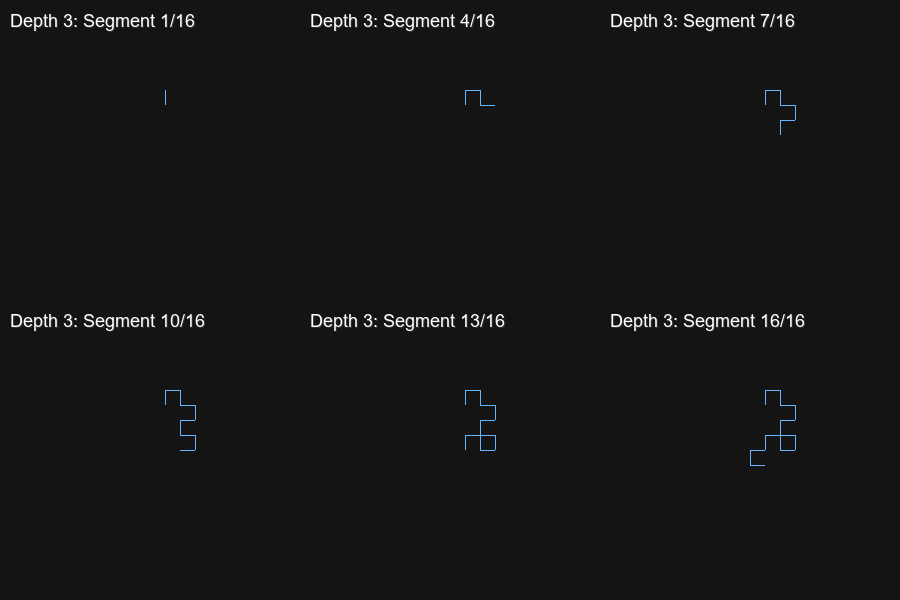
The expected output when your implementation is correct. The depth 3 dragon curve produces the sequence RRLRRLLRRRLRLLL with 16 line segments.#
Challenge Extension: Twin Dragons#
The dragon curve has a beautiful property: two dragon curves can tile together perfectly, creating a “twin dragon” that fills a bounded region of the plane without overlapping [Knuth1970].
Challenge
Modify the code to draw two dragon curves starting from the same point but facing opposite directions. Use different colors for each curve.
Hint: Generate the same sequence but start one curve facing UP and the other facing DOWN (or LEFT and RIGHT).
Twin Dragon Solution
# Draw first dragon (blue, facing UP)
draw_dragon_curve(canvas, sequence, (400, 300), step_size, UP, (100, 180, 255))

# Draw second dragon (orange, facing DOWN)
draw_dragon_curve(canvas, sequence, (400, 300), step_size, DOWN, (255, 150, 100))
The two curves will interlock, demonstrating the space-filling property of the dragon curve.
Expected Output:
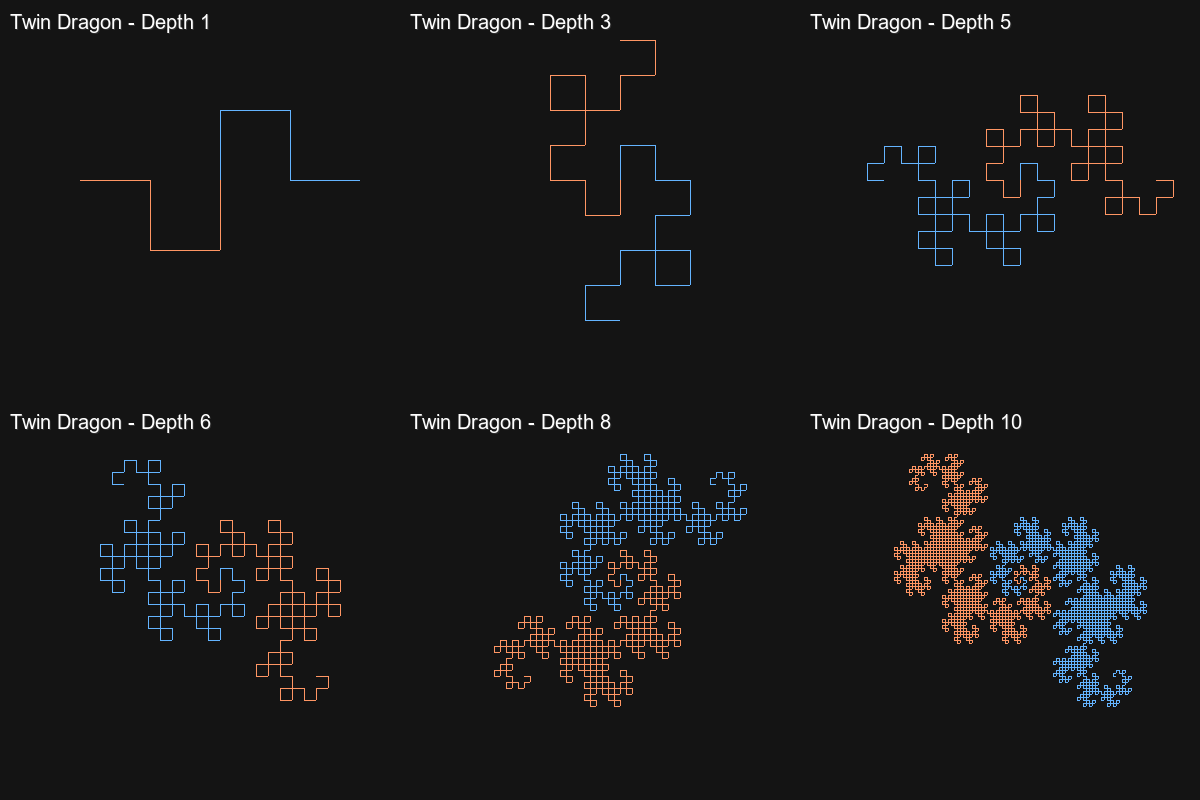
Twin dragon curves growing through depths 1-10. The blue dragon faces UP while the orange dragon faces DOWN, creating an interlocking pattern.#
Exploring Depth Progression#
The animated visualization below shows how the dragon curve evolves through successive iterations. Watch how complexity emerges from the simple folding rule:
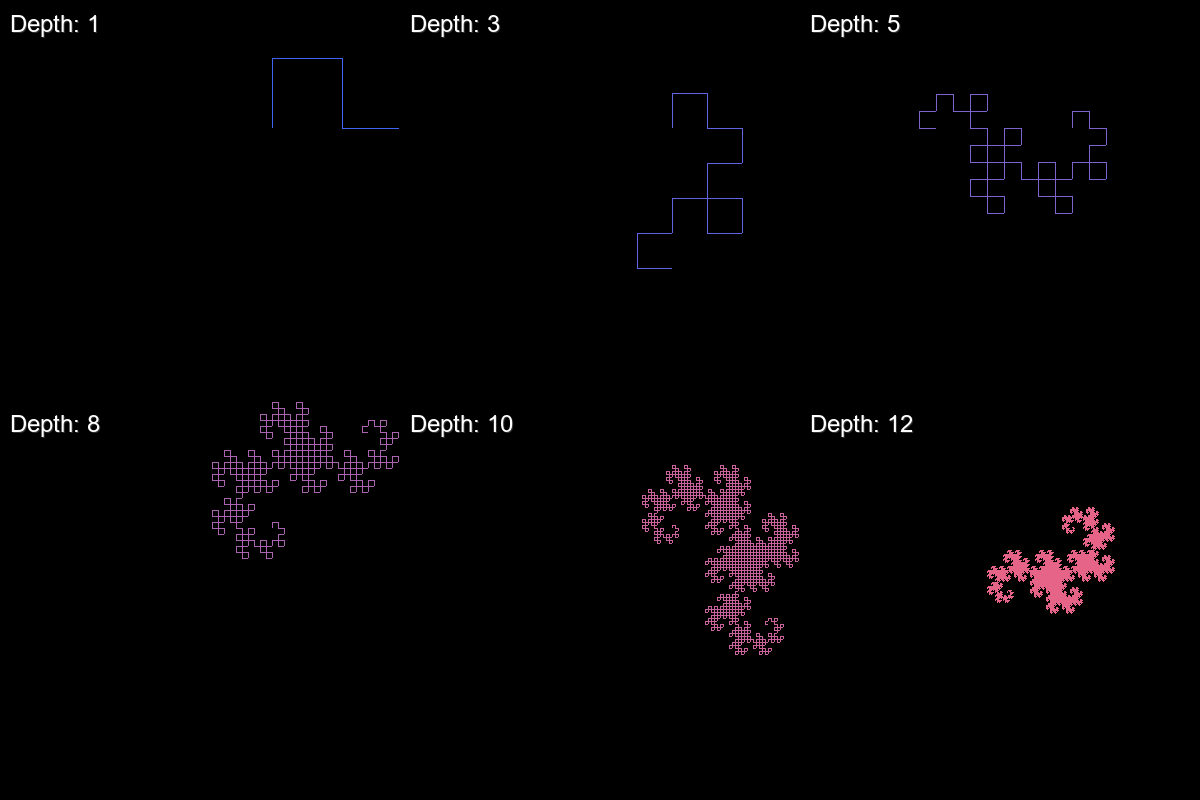
The dragon curve growing from depth 1 to depth 12. Each iteration doubles the number of segments and reveals more intricate self-similar detail.#
For a side-by-side comparison, examine the depth comparison grid:
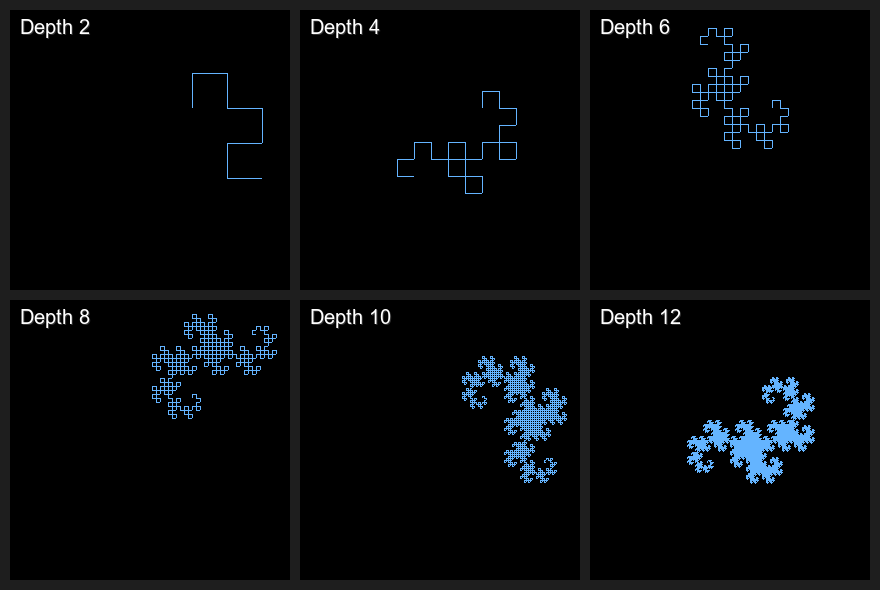
Dragon curves at depths 2, 4, 6, 8, 10, and 12. Notice how the basic shape emerges by depth 4, but finer details continue to appear at higher depths.#
Summary#
Key Takeaways#
In this exercise, you learned:
The Heighway dragon curve emerges from a simple paper-folding process
The recursive rule: \(D_n = D_{n-1} + R + \text{reverse}(\text{invert}(D_{n-1}))\)
The sequence length follows \(2^{n+1} - 1\) for depth \(n\)
Turtle graphics interprets the L/R sequence as drawing instructions
The dragon curve is self-similar - each half contains a scaled copy of the whole
The curve never crosses itself, a property that enables plane-tiling
Common Pitfalls#
Array bounds errors: At high depths with large step sizes, the curve may extend beyond the canvas. Reduce
step_sizeor increase canvas dimensions.Forgetting the base case: Without
if depth == 0: return initial_turn, the recursion never terminates.Confusing sequence reversal and inversion: Reversal reads backward (
[::-1]); inversion swaps L and R. Both are needed for the second half.Starting position issues: The dragon curve grows in unexpected directions. Experiment with starting positions to center the final result.
References#
Gardner, M. (1967, March). Mathematical Games: The fantastic combinations of John Conway’s new solitaire game “life.” Scientific American, 216(3), 112-117. [First popular description of the dragon curve]
Davis, C., & Knuth, D. E. (1970). Number representations and dragon curves - I, II. Journal of Recreational Mathematics, 3(2), 66-81 and 3(3), 133-149. [Mathematical analysis of dragon curve properties]
Knuth, D. E. (1970). An analysis of the random dragon curve. Unpublished manuscript. [Properties of space-filling twin dragons]
Mandelbrot, B. B. (1982). The Fractal Geometry of Nature. W. H. Freeman and Company. ISBN: 978-0-7167-1186-5. [Foundational text on fractal geometry]
Prusinkiewicz, P., & Lindenmayer, A. (1990). The Algorithmic Beauty of Plants. Springer-Verlag. ISBN: 978-0-387-97297-8. [L-systems and recursive plant generation]
Harris, C. R., Millman, K. J., van der Walt, S. J., et al. (2020). Array programming with NumPy. Nature, 585, 357-362. https://doi.org/10.1038/s41586-020-2649-2 [NumPy documentation reference]
Clark, A., et al. (2024). Pillow: Python Imaging Library (Version 10.x) [Computer software]. Python Software Foundation. https://python-pillow.org/ [Image processing library]
Wikipedia contributors. (2024). Dragon curve. Wikipedia, The Free Encyclopedia. https://en.wikipedia.org/wiki/Dragon_curve [General reference with algorithm details and history]