
2.1.2 - Drawing Triangles#
- Duration:
20 minutes
- Level:
Beginner
Overview#
Triangles are the basic building blocks of computer graphics. Every 3D model in video games, movies, and simulations is made of triangles. Why? Three points always define a flat surface, making triangles simple to work with and fast to render.
In this exercise, you will learn two ways to draw filled triangles: the edge function method and the matrix operations method. You will also create a mountain landscape using overlapping triangles.
Learning Objectives
By completing this exercise, you will:
Understand triangles as intersections of three half-planes defined by line equations
Implement the edge function algorithm for filled triangle rasterization
Master NumPy’s vector transpose and broadcasting for efficient geometric operations
Create layered compositions by combining multiple triangles with depth ordering
Quick Start: Draw Your First Triangle#
Let’s start by drawing a simple filled triangle. This demonstrates the core concept: a triangle is the region where three half-planes overlap.
 1import numpy as np
 2from PIL import Image
 3
 4# Create coordinate grids for every pixel
 5height, width = 400, 400
 6y_coords, x_coords = np.meshgrid(np.arange(height), np.arange(width), indexing='ij')
 7
 8# Define triangle vertices (clockwise order)
 9v1 = (200, 50)   # top vertex
10v2 = (350, 350)  # bottom right
11v3 = (50, 350)   # bottom left
12
13# Edge function: determines which side of a line a point lies on
14def edge_function(x, y, x1, y1, x2, y2):
15    """Returns negative if point (x,y) is to the right of edge from (x1,y1) to (x2,y2)"""
16    return (x - x1) * (y2 - y1) - (y - y1) * (x2 - x1)
17
18# Check if each pixel is inside the triangle
19# For clockwise vertices, inside points have edge_function <= 0 for all edges
20inside_edge1 = edge_function(x_coords, y_coords, v1[0], v1[1], v2[0], v2[1]) <= 0
21inside_edge2 = edge_function(x_coords, y_coords, v2[0], v2[1], v3[0], v3[1]) <= 0
22inside_edge3 = edge_function(x_coords, y_coords, v3[0], v3[1], v1[0], v1[1]) <= 0
23
24# A pixel is inside the triangle if it passes all three edge tests
25triangle_mask = inside_edge1 & inside_edge2 & inside_edge3
26
27# Create image and fill triangle
28canvas = np.zeros((height, width), dtype=np.uint8)
29canvas[triangle_mask] = 255
30
31Image.fromarray(canvas).save('simple_triangle.png')
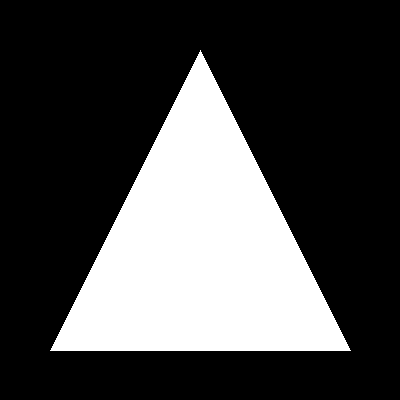
A filled triangle with vertices at (200, 50), (350, 350), and (50, 350). The edge function algorithm determines which pixels lie inside the triangle by checking their position relative to each edge.#
Tip
The key insight: A triangle is where three half-planes intersect. Each edge of the triangle divides the plane into two halves. The triangle is the region that lies on the “inside” of all three edges simultaneously.
Core Concept 1: Triangles as Half-Plane Intersections#
The Mathematics of Half-Planes#
Every line in 2D space divides the plane into two half-planes. For a line passing through points \((x_1, y_1)\) and \((x_2, y_2)\), we can determine which side of the line any point \((x, y)\) lies on using the edge function:
This function returns:
Positive values for points on the left side of the edge
Negative values for points on the right side
Zero for points exactly on the line
A point lies inside a triangle if and only if it is on the correct side of all three edges. For vertices defined in clockwise order, this means \(E \leq 0\) for all three edges [Pineda1988].
Important
Vertex winding order matters. If vertices are defined clockwise, inside points have \(E \leq 0\). If counterclockwise, inside points have \(E \geq 0\). Consistency is key!
Why This Works#
Consider a triangle ABC. The edge from A to B creates a half-plane containing C. Similarly, edges BC and CA create half-planes containing A and B respectively. The triangle is the intersection of these three half-planes.
# For a triangle with vertices v1, v2, v3 (clockwise):
# - Points inside are to the RIGHT of edge v1→v2
# - Points inside are to the RIGHT of edge v2→v3
# - Points inside are to the RIGHT of edge v3→v1

inside = (edge(v1, v2) <= 0) & (edge(v2, v3) <= 0) & (edge(v3, v1) <= 0)
This algorithm is remarkably efficient because each edge test is independent perfect for NumPy’s vectorized operations [Shirley2009].
Did You Know?
The edge function algorithm was first described by Juan Pineda at Pixar in 1988 and remains the foundation of hardware triangle rasterization in modern GPUs [Pineda1988].
Core Concept 2: Matrix Operations for Triangles#
The Elegant x + x.T Pattern#
NumPy offers an alternative approach that showcases the power of array broadcasting [NumPyBroadcasting]. Instead of explicitly testing edges, we can use mathematical properties of coordinate sums.
Consider creating a column vector x containing values 0 to 399, then adding it to its own transpose:
x = np.arange(400).reshape(400, 1)  # Shape: (400, 1)
distance_matrix = x + x.T           # Shape: (400, 400)
What happens here? NumPy broadcasts:
xhas shape (400, 1)x.Thas shape (1, 400)The sum has shape (400, 400), where element [i, j] = i + j
This creates a matrix where each element equals the sum of its row and column indices naturally forming diagonal boundaries!
 1import numpy as np
 2from PIL import Image
 3
 4# Create column vector and compute distance matrix
 5x = np.arange(400).reshape(400, 1)
 6distance_matrix = x + x.T  # element [i,j] = i + j
 7
 8# Threshold creates diagonal boundary: i + j <= 400
 9threshold = 400
10triangle_mask = distance_matrix <= threshold
11
12# Create image
13canvas = np.zeros((400, 400), dtype=np.uint8)
14canvas[triangle_mask] = 255
15
16Image.fromarray(canvas).save('triangle_matrix.png')
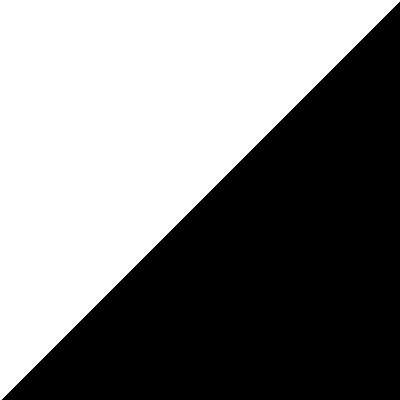
A right triangle created using the x + x.T pattern. The boundary follows the diagonal where row + column = 400. This elegant approach demonstrates NumPy’s broadcasting power.#
Comparing the Two Approaches#
Both methods produce filled triangles, but they have different strengths:
Edge Function Method:
Works for any triangle shape (any three vertices)
Generalizes to any convex polygon
More intuitive geometric understanding
Used in GPU hardware rasterizers
Matrix Operations Method:
More elegant and compact code
Faster for axis-aligned right triangles
Demonstrates NumPy broadcasting mastery
Limited to specific triangle orientations
Note
The matrix method creates triangles aligned with coordinate axes. For arbitrary triangles, use the edge function approach. Both are valuable tools in your computational geometry toolkit!
Hands-On Exercises#
Exercise 1: Execute and Explore#
Run both simple_triangle.py and triangle_matrix.py. Compare the outputs and observe the differences.
Reflection Questions:
What shape does the matrix method (
x + x.T) produce? Why does it only create right triangles?In the edge function method, what happens if you reverse the vertex order from clockwise to counterclockwise?
Why do we use
<=instead of<in the edge function test?
Solution & Explanation
Answer to Question 1: The x + x.T pattern creates a matrix where element [i, j] = i + j. Setting a threshold like i + j <= 400 creates a boundary along the diagonal from (0, 400) to (400, 0). This is always a right triangle because the boundary is a straight line at 45 degrees. The matrix method cannot create arbitrary triangles only axis-aligned right triangles.
Answer to Question 2: Reversing vertex order (counterclockwise instead of clockwise) inverts the edge function signs. Points that were “inside” become “outside” and vice versa. To fix this, change <= 0 to >= 0 in all three edge tests. The output would be the same triangle, but the algorithm’s internal logic is inverted.
Answer to Question 3: Using <= instead of < includes points exactly on the edge (where \(E = 0\)). This ensures the triangle boundary is solid without gaps. If we used strict <, pixels exactly on edges would not be filled, creating visible seams.
Exercise 2: Modify Parameters#
Modify simple_triangle.py to achieve these goals:
Goals:
Create an inverted triangle (pointing downward) with the same size
Create a smaller triangle centered in the canvas
Create a colored triangle (red fill on white background)
Hints
Hint for Goal 1: Swap the y-coordinates of the vertices. The top vertex should have a larger y-value than the bottom vertices.
Hint for Goal 2: Calculate vertices relative to the center (200, 200). For example, a triangle with 100-pixel height might have vertices at (200, 150), (250, 250), (150, 250).
Hint for Goal 3: Change the canvas to RGB with shape (400, 400, 3). Use [255, 0, 0] for red fill and initialize with np.full((400, 400, 3), 255, dtype=np.uint8) for white background.
Solutions
1. Inverted Triangle:
# Original: pointing up
v1 = (200, 50)   # top
v2 = (350, 350)  # bottom right
v3 = (50, 350)   # bottom left

# Inverted: pointing down (flip y-coordinates)
v1 = (200, 350)  # bottom (now lowest y)
v2 = (350, 50)   # top right
v3 = (50, 50)    # top left
2. Smaller Centered Triangle:
# Centered at (200, 200) with 100px height
v1 = (200, 150)  # top
v2 = (250, 250)  # bottom right
v3 = (150, 250)  # bottom left
3. Red Triangle on White Background:
# Create white RGB canvas
canvas = np.full((400, 400, 3), 255, dtype=np.uint8)

# Fill triangle with red [R, G, B]
canvas[triangle_mask] = [255, 0, 0]

# Save with RGB mode
Image.fromarray(canvas, mode='RGB').save('red_triangle.png')
Exercise 3: Create Mountain Silhouette#
Create a mountain landscape with at least 3 overlapping triangles and a gradient sky background.
Requirements:
Canvas size: 400 x 500 pixels (RGB)
Gradient sky from dark blue (top) to orange (bottom)
At least 3 mountains of different sizes
Mountains should overlap with proper depth ordering (background first)
import numpy as np
from PIL import Image

def draw_filled_triangle(canvas, v1, v2, v3, color):
    """Fill a triangle with the given color (R, G, B)"""
    # TODO: Implement edge function algorithm for RGB canvas
    pass

def create_gradient_sky(height, width):
    """Create vertical gradient from blue to orange"""
    # TODO: Interpolate colors from top to bottom
    pass

# Create canvas with gradient sky
height, width = 400, 500
canvas = create_gradient_sky(height, width)

# TODO: Define and draw mountains (back to front)
# Mountain format: peak position, left base, right base, color

Image.fromarray(canvas).save('triangle_mountain.png')
Complete Solution
 1import numpy as np
 2from PIL import Image
 3
 4def draw_filled_triangle(canvas, v1, v2, v3, color):
 5    """Fill a triangle defined by three vertices with a given RGB color."""
 6    height, width = canvas.shape[:2]
 7    y_coords, x_coords = np.meshgrid(np.arange(height), np.arange(width), indexing='ij')
 8
 9    def edge_function(x, y, x1, y1, x2, y2):
10        return (x - x1) * (y2 - y1) - (y - y1) * (x2 - x1)
11
12    # Test all three edges (clockwise vertex order)
13    e1 = edge_function(x_coords, y_coords, v1[0], v1[1], v2[0], v2[1])
14    e2 = edge_function(x_coords, y_coords, v2[0], v2[1], v3[0], v3[1])
15    e3 = edge_function(x_coords, y_coords, v3[0], v3[1], v1[0], v1[1])
16
17    inside = (e1 <= 0) & (e2 <= 0) & (e3 <= 0)
18    canvas[inside] = color
19
20def create_gradient_sky(height, width):
21    """Create vertical gradient from midnight blue to sunset orange."""
22    sky = np.zeros((height, width, 3), dtype=np.uint8)
23    top_color = np.array([25, 25, 112])      # Midnight blue
24    bottom_color = np.array([255, 140, 50])  # Sunset orange
25
26    for y in range(height):
27        t = y / height
28        color = (1 - t) * top_color + t * bottom_color
29        sky[y, :] = color.astype(np.uint8)
30
31    return sky
32
33# Create canvas with gradient sky
34height, width = 400, 500
35canvas = create_gradient_sky(height, width)
36
37# Define mountains (back to front for proper layering)
38mountains = [
39    {'peak': (400, 80), 'left': (250, 400), 'right': (500, 400),
40     'color': (100, 100, 120)},   # Distant
41    {'peak': (150, 120), 'left': (0, 400), 'right': (320, 400),
42     'color': (70, 80, 90)},      # Middle
43    {'peak': (300, 180), 'left': (150, 400), 'right': (480, 400),
44     'color': (40, 45, 50)},      # Foreground
45    {'peak': (80, 250), 'left': (0, 400), 'right': (200, 400),
46     'color': (30, 35, 40)},      # Closest
47]
48
49# Draw mountains from back to front
50for m in mountains:
51    draw_filled_triangle(canvas, m['peak'], m['right'], m['left'], m['color'])
52
53Image.fromarray(canvas).save('triangle_mountain.png')
How it works:
Lines 12-13: The edge function tests whether each pixel is inside the triangle boundary. We check all three edges simultaneously using NumPy broadcasting.
Lines 28-30: The gradient is created by linear interpolation between two colors. The parameter
tvaries from 0 (top) to 1 (bottom).Lines 55-58: Drawing from back to front ensures closer mountains correctly overlap distant ones. This is called the painter’s algorithm draw distant objects first, then paint over them with closer objects.
Challenge Extension: Add a sun (circle) in the sky, or create a reflection by flipping the mountains and drawing them with reduced opacity below a “water line.”
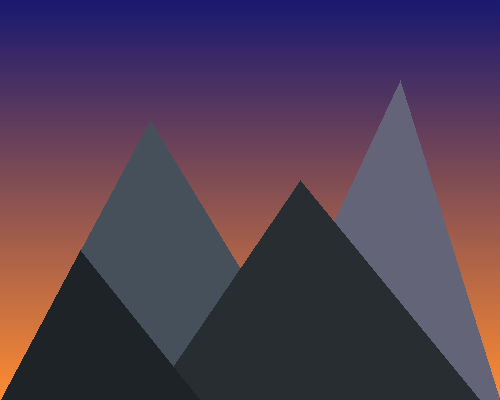
Output Image#
Summary#
In this exercise, you have mastered two approaches to triangle rasterization.
Key Takeaways:
Triangles are intersections of three half-planes, each defined by an edge
The edge function \(E(x,y) = (x-x_1)(y_2-y_1) - (y-y_1)(x_2-x_1)\) determines which side of a line a point lies on
The
x + x.Tpattern creates matrices with diagonal boundaries elegant for right trianglesVertex winding order (clockwise vs counterclockwise) determines inside/outside orientation
The painter’s algorithm (back to front) handles overlapping shapes correctly
Common Pitfalls to Avoid:
Wrong winding order: If your triangle appears inverted or empty, check vertex order. Clockwise expects
<= 0; counterclockwise expects>= 0.Forgetting to use RGB mode: When saving color images, use
Image.fromarray(canvas, mode='RGB')to ensure proper color interpretation [PillowDocs].Drawing order matters: For overlapping shapes, draw background objects first. The last drawn shape appears on top.
Integer vs float coordinates: Vertex coordinates should be integers for pixel-perfect triangles. Use
int()orround()when calculating positions.
Triangles are the foundation of 3D graphics. Every mesh in video games and CGI is composed of triangles because they are the simplest polygon that defines a unique plane. The edge function you learned here is implemented directly in GPU hardware for real-time rendering [Pineda1988].
References#
Pineda, J. (1988). A parallel algorithm for polygon rasterization. ACM SIGGRAPH Computer Graphics, 22(4), 17-20. https://doi.org/10.1145/378456.378457 [Original paper describing the edge function algorithm, now implemented in GPU hardware]
Shirley, P., & Marschner, S. (2009). Fundamentals of Computer Graphics (3rd ed.). A K Peters/CRC Press. ISBN: 978-1568814698 [Chapter 3: Rasterization - comprehensive coverage of triangle drawing algorithms]
Foley, J. D., van Dam, A., Feiner, S. K., & Hughes, J. F. (1990). Computer Graphics: Principles and Practice (2nd ed.). Addison-Wesley. ISBN: 978-0201121100 [Section 3.6: Polygon Fill Algorithms]
Gonzalez, R. C., & Woods, R. E. (2018). Digital Image Processing (4th ed.). Pearson. ISBN: 978-0133356724 [Standard textbook for image processing fundamentals]
NumPy Developers. (2024). Broadcasting. NumPy Documentation. Retrieved January 30, 2025, from https://numpy.org/doc/stable/user/basics.broadcasting.html [Official documentation explaining NumPy’s broadcasting rules]
Harris, C. R., Millman, K. J., van der Walt, S. J., et al. (2020). Array programming with NumPy. Nature, 585(7825), 357-362. https://doi.org/10.1038/s41586-020-2649-2 [Foundational paper on NumPy array operations]
Clark, A., et al. (2024). Pillow: Python Imaging Library. Pillow Documentation. Retrieved January 30, 2025, from https://pillow.readthedocs.io/ [Official documentation for image saving and manipulation]